![logo-type_black 2.svg]](https://help.collaboard.app/hubfs/logo-type_black%202.svg)
The Audit Log provides full transparency into relevant activities in Collaboard. It helps administrators track changes, monitor events, and support compliance with organizational and security requirements.
Audit logs are automatically generated for all users within a customer tenant and can be downloaded directly from the Collaboard settings.
Retention period
Audit logs are stored for a limited time, depending on the environment:
-
Collaboard WEB & CH: 90 days
-
Collaboard DE: 365 days
Download audit logs
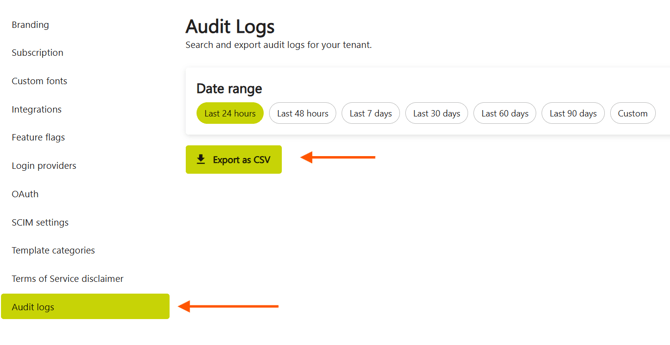
To download audit logs:
-
Open the Collaboard settings.
-
Select the desired date range.
-
Click Export as CSV.
In the CSV fiel you will find the following colums
| Column | Description |
| Timestamp | Time when the action occurred userAgent: Information about the browser used to perform the action |
| User | User who performed the action |
| IpAddress | Internal IP address |
| Category | Category related to the action. Each action belongs to a category. Below you will find an overview of each action per category.
|
| Action | Information about what happened |
| Message | Explanatory message providing additional details about the action, including related objects. |
| Metadata | JSON string with additional dynamic information about the action. |
List of all Audit log categories and actions
Administration:
| Action | Description |
| JIRA_INTEGRATION_UPDATED |
AI:
| Action | Description |
| IMAGE_BACKGROUND_REMOVAL | |
| STICKY_NOTE_DETECTION |
Authentication
| Action | Description |
| APIKEY_CREATED | |
| LOGIN_SUCCEEDED | |
| PASSWORD_RESET | |
| LOGIN_FAILED | |
| USER_UPDATED | Changes of Authentication methode (for example when a user enables/disables 2FA via Authenticator app, or OTP code) |
| USER_PHOTO_UPDATED | |
| LOGINPROVIDER_UPDATED | |
| OAUTHCLIENT_CREATED | |
| OAUTHCLIENT_UPDATED | |
| REFRESH_TOKEN_REVOKED | |
| TENANT_CREATED | |
Configuration
| Action | Description |
| UI_SETTINGS_UPDATED |
Changes in the settings such as
|
Licensing
| Action | Description |
| SUBSCRIPTIONUSER_CREATED | |
| SUBSCRIPTIONUSER_IMPORTED | |
| SUBSCRIPTIONUSER_INVITED | |
| SUBSCRIPTIONUSER_UPDATED | |
| SUBSCRIPTIONUSER_INVITATION_ACCEPTED | |
| SUBSCRIPTIONUSER_DELETED | |
| SUBSCRIPTIONUSERS_EXPORTED |
Projects (Whiteboards)
| Action | Description |
| PROJECT_CREATED | |
| PROJECT_DELETED | |
| PROJECT_VIEWED | |
| PROJECT_CANVAS_CHANGED | |
| FILE_UPLOADED | |
| FILE_DOWNLOADED | |
| PROJECT_IMPORTED_FROM_PDF | |
| PROJECT_INVITATION_CREATED | |
| PROJECT_INVITATION_ACCEPTED | |
| PROJECT_GUEST_INVITATION_ACCEPTED | |
| PROJECT_PERMISSION_UPDATED | |
| PROJECT_CANVAS_EXPORTED | |
| PROJECT_RENAMED | |
| PROJECT_TAG_CREATED | |
| PROJECT_LOGOUT | |
| PROJECT_SPACE_UPDATED | |
| PROJECT_ACTIVITY_ENABLED | |
| PROJECT_ACTIVITY_DISABLED | |
| PROJECT_VERSION_DISABLED | |
| PROJECT_ARCHIVED |
Spaces:
| Action | Description |
| SPACE_CREATED | |
| SPACE_UPDATED | |
| SPACE_INVITATION_CREATED | |
| SPACE_PERMISSION_UPDATED | |
| SPACE_DELETED |
Storage:
| Action | Description |
| FILE_UPLOADED | Upload a file via the back-office. For example for the in-app news feed. |
Templates:
| Action | Description |
| TEMPLATE_CREATED | |
| TEMPLATE_UPDATED | |
| TEMPLATE_VIEWED | |
| TEMPLATE_FAVORITE_REMOVED | |
| TEMPLATE_DELETED |
User
| Action | Description |
| USER_UPDATED | |
| USER_DELETED | |
| SUBSCRIPTIONUSERS_EXPORTED |