![logo-type_black 2.svg]](https://help.collaboard.app/hubfs/logo-type_black%202.svg)
Connect your Collaboard account with Jira to synchronize Jira issues directly on the whiteboard. Once connected, issues can be synced bi-directionally — changes made in Collaboard are reflected in Jira and vice versa.
This article explains how to connect Collaboard with Jira. A separate article covers how to work with Jira issues on the board.
Prerequisites
Before users can connect their accounts, the Jira integration must be enabled by an administrator.
Administrators can activate the integration in:
Settings → Feature Flags → Integrations → Jira
Once enabled, every user can connect their own Jira account.
Connect your Jira account
To connect Collaboard with Jira:
-
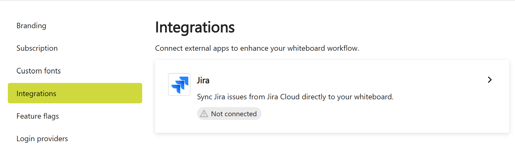
Open Settings.
-
Navigate to Integrations.
-
Select Jira.
-
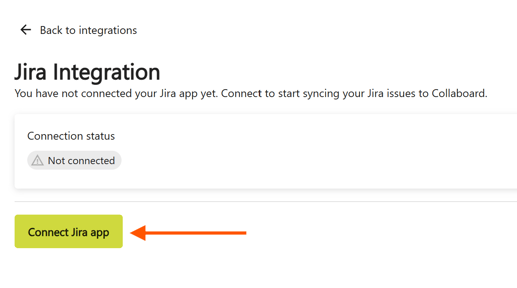
Click Connect Jira App.
You will be redirected to Jira to complete the authorization.
After successful authentication, your Jira account is connected to Collaboard.
Alternative way to connect Jira from the whiteboard
You can also connect your Jira account directly while working on a whiteboard.
If Jira is not yet configured, click the Jira icon on the board. A message appears indicating that configuration is required.
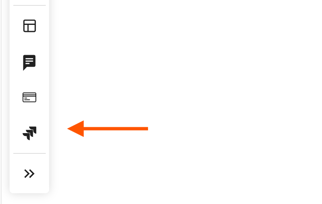
Click Configure Jira to open the settings page, where you can connect your Jira account.
After completing the connection, you can immediately start using and synchronizing Jira issues on the whiteboard.
What happens after connecting
-
Jira issues can be added to the whiteboard.
-
Changes made in Collaboard are synchronized with Jira.
-
Updates made in Jira are synchronized back to Collaboard.
This ensures that your team can collaborate visually on the whiteboard while staying aligned with Jira workflows and project data.